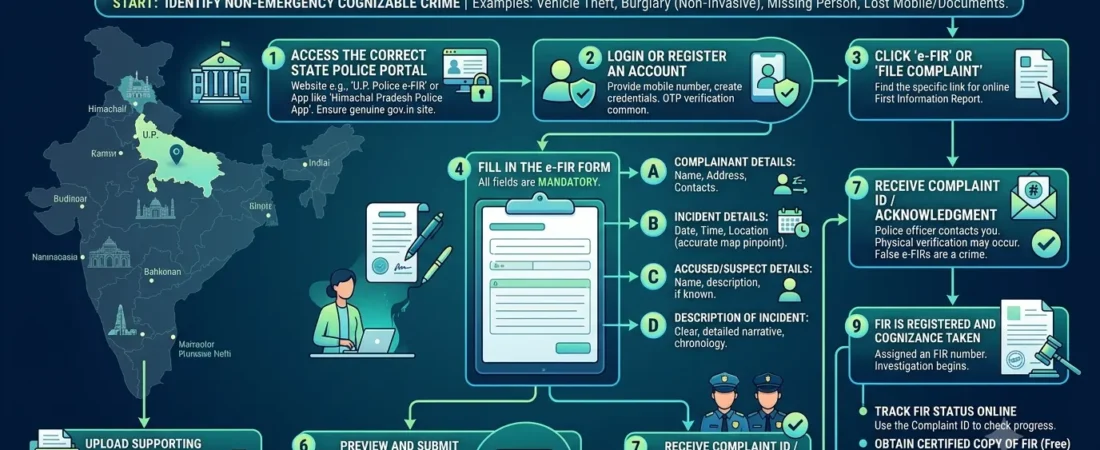
Facing a crime leaves victims feeling helpless, frustrated, and deeply anxious about visiting police stations in person. Therefore, learning How to File an Online FIR / E-FIR allows you to secure immediate legal relief directly from your smartphone or computer.
Written by Kapil Balhara | Technically Reviewed for Accuracy | Last Updated: October 2026
Table of Contents
- Understanding the E-FIR System in India
- Offences Allowed for Online FIR Registration
- Official State Police Portals and Mobile Apps List
- Step-by-Step E-FIR Registration Process
- Tracking, Downloading, and Converting E-FIRs
- Post-Submission Workflow: What Happens Next
- Frequently Asked Questions
Understanding the E-FIR System in India
Digital governance has reshaped how citizens interact with law enforcement authorities across Indian states. Consequently, online portals reduce procedural hurdles while creating transparent digital trails.
Under Section 173 of the Bharatiya Nagarik Suraksha Sanhita (BNSS), law enforcement agencies process digital information systematically. This statutory framework authorizes police departments to accept electronic disclosures regarding crimes.
Key Takeaway: An e-FIR eliminates physical station visits during initial reporting. It generates an immutable electronic record that prevents local police inaction or administrative suppression.
Definition and Summary Block
Learning how to file an online FIR / e-FIR enables citizens to submit electronic crime reports through official web portals. An e-FIR is an electronically recorded complaint filed for specified offences like vehicle theft or document loss. It assigns an instant tracking number, initiates police verification, and downloads as a digitally signed document.
In our legal practice, we frequently observe citizens confusing online lost report portals with formal e-FIR registrations. Therefore, review the comparative breakdown below to understand their legal characteristics.
| Portal Feature | Online E-FIR System | Online Lost Article Report (LDR) |
|---|---|---|
| Legal Status | Formal First Information Report | Non-cognizable administrative log entry |
| Offence Scope | Vehicle theft, cyber crime, minor property theft | Lost mobile phones, passports, government IDs |
| Police Investigation | Mandatory investigative assignment | No formal police investigation initiated |
| Arrest Authority | Police hold statutory arrest powers | No arrest powers triggered |
| Governing Statute | Section 173 BNSS | Section 177 BNSS |
Offences Allowed for Online FIR Registration
State governments restrict e-FIR systems to specific crime categories to prevent portal misuse. Therefore, checking eligible crime classifications saves valuable time during emergencies.
Offences Allowed for Online FIR Registration
Most state police portals accept e-FIR submissions for property-related offences where perpetrators remain unknown. Specifically, vehicle theft, motor vehicle tampering, and house burglary without physical violence qualify for online filing.
Furthermore, cyber crimes represent a major category for electronic reporting. Online financial fraud, identity theft, cyberstalking, social media account hacking, and phishing scams can be reported directly online.
In addition, senior citizens and women can report harassment or domestic intimidation through dedicated portal modules. However, heinous offences involving violent assault or homicide require immediate physical police intervention.
In Youth Bar Association of India v. Union of India (2016), the Supreme Court mandated that registered FIRs must be uploaded online within 24 to 48 hours to preserve public transparency.
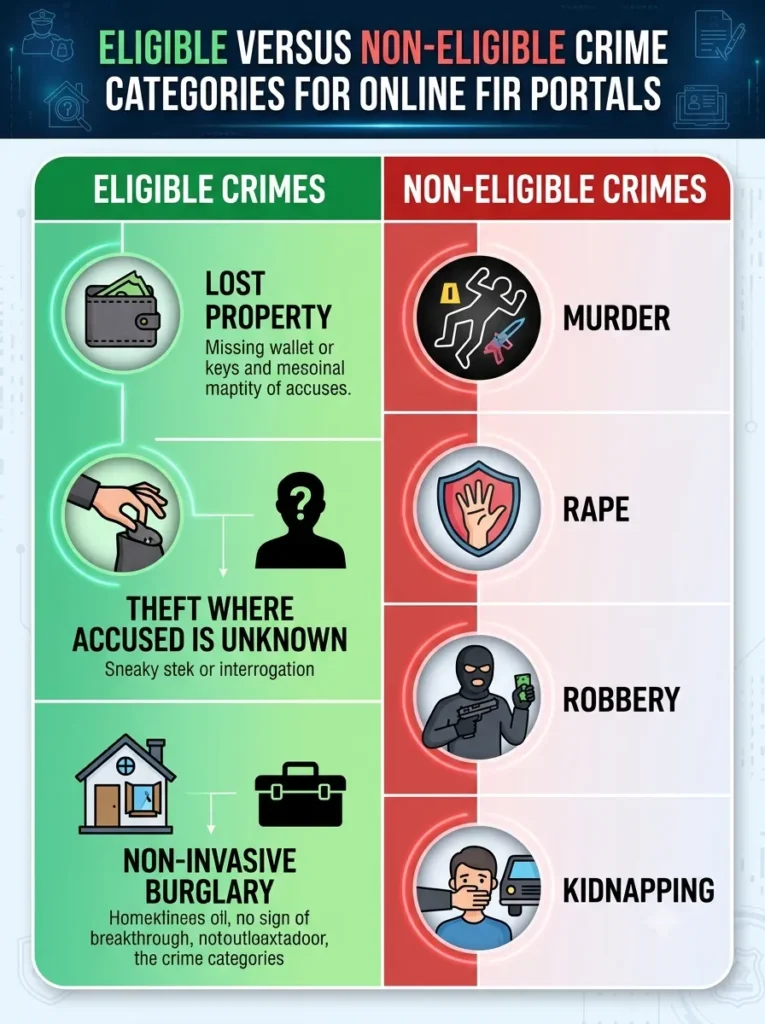
Key Takeaway: Always verify whether your specific incident matches the portal’s eligible crime list before filing. Reporting violent offences online may delay necessary physical emergency responses.
Official State Police Portals and Mobile Apps List
Every Indian state operates its own independent digital policing infrastructure. Consequently, citizens must access the correct regional portal corresponding to the geographic location of the crime.
Official State Police Portals and Mobile Apps List
In our testing across state systems, accessing state-specific citizen service portals ensures faster complaint processing. Below is a structured reference list of primary state portals and mobile applications.
- Delhi Police: Web Portal: delhipolice.gov.in | Mobile App: Tatpar / Delhi Police Citizen App
- Uttar Pradesh Police: Web Portal: uppolice.gov.in | Mobile App: UPCOP App
- Maharashtra Police: Web Portal: mahapolice.gov.in | Mobile App: Citizen Portal Maharashtra Police
- Tamil Nadu Police: Web Portal: tnpolice.gov.in | Mobile App: KAVAL UDHAVI App
- Karnataka Police: Web Portal: ksp.karnataka.gov.in | Mobile App: KSP Citizen App
- National Cyber Crime Reporting Portal: Web Portal: cybercrime.gov.in | Helpline: 1930
In addition, the Crime and Criminal Tracking Network & Systems (CCTNS) integrates these state portals nationally. This integration allows seamless cross-border data verification between different state jurisdictions.
Step-by-Step E-FIR Registration Process
Completing an electronic application requires careful handling of personal credentials and factual entries. Therefore, organize your identity proofs and supporting documents before logging in.
User Registration and OTP Identification Process
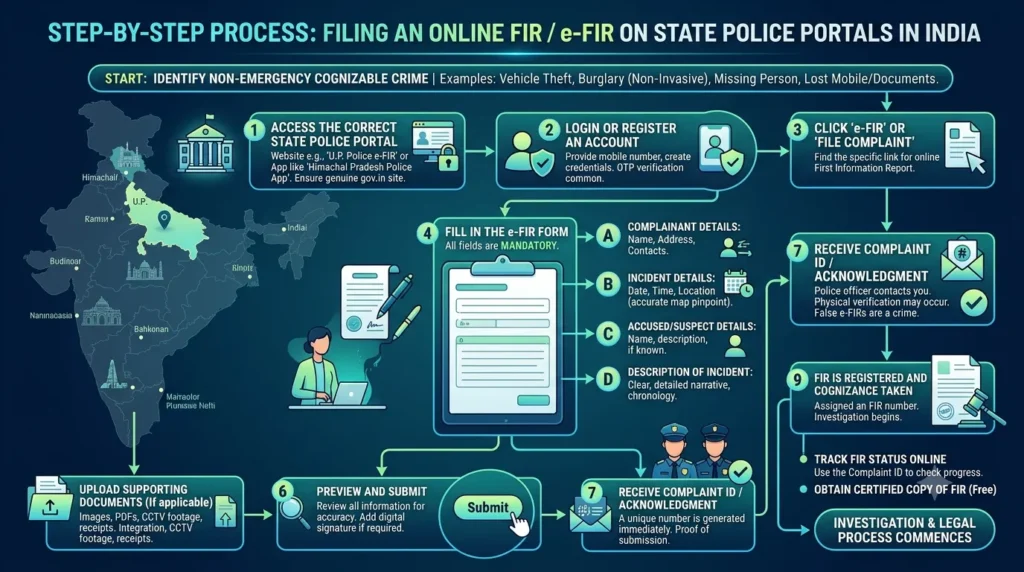
To begin, navigate to your respective state police citizen portal or open the official mobile app. Click on the “Citizen Services” tab and select “E-FIR Registration”.
Next, create a user account by entering your full name, valid email address, and mobile number. The portal sends a One-Time Password (OTP) to verify your contact information securely.
In addition, enter your Aadhaar number or passport details for identity authentication. Proper identity verification prevents anonymous false complaints and ensures statutory accountability.
Filling Complaint Details and Suspect Info Online
After completing authentication, select the precise incident category from the drop-down menu. State the exact date, time, and geographic location where the crime took place.
Furthermore, describe the incident in detail within the narrative text box. Provide a chronological description of events, including stolen item values or financial loss amounts.
If suspect details are available, enter their names, phone numbers, or social media handles. If suspects are unknown, describe their physical appearance, language, or vehicle registration numbers carefully.
Uploading Supporting Documents and Digital Evidence
Attaching digital evidence strengthens your electronic complaint significantly. Therefore, upload clear digital files in PDF, JPG, or PNG formats.
- Identity Proof: Upload self-attested copies of your Aadhaar card, Voter ID, or Driving License.
- Ownership Documents: Attach vehicle registration certificates (RC), purchase invoices, or insurance policies for theft reports.
- Financial Proofs: Upload bank account statements, UPI payment screenshots, or credit card transaction slips for fraud cases.
- Location Screenshots: Include map location snapshots or CCTV video clips showing the incident scene.
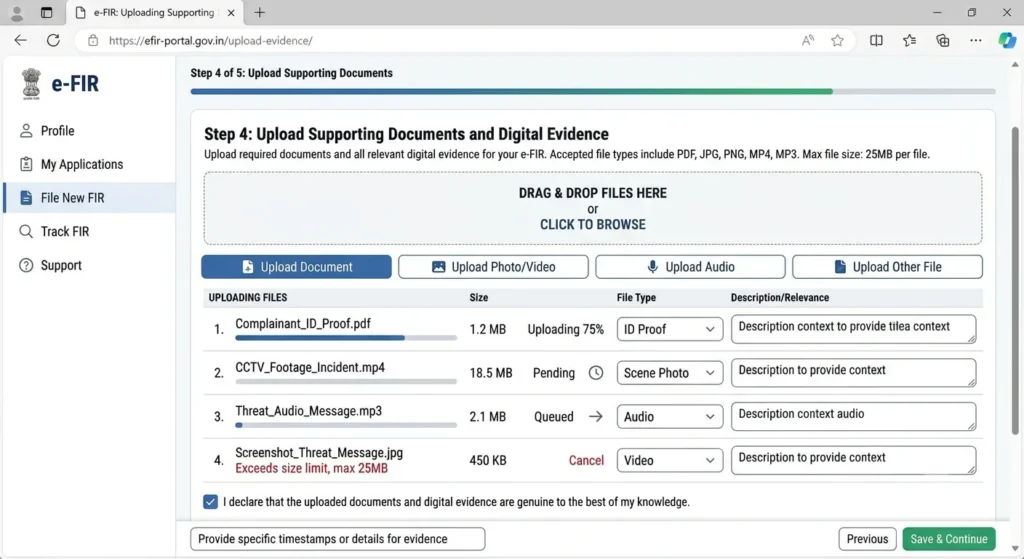
Key Takeaway: Ensure file sizes remain within portal limits (usually under 2MB to 5MB per file). Clear file naming helps reviewing officers process evidence quickly.
Tracking, Downloading, and Converting E-FIRs
Once you submit your application, the portal generates a temporary reference ID. Subsequently, this identifier allows you to monitor administrative progress in real time.
Tracking E-FIR Status via Reference Number
To monitor progress, navigate to the “Track Complaint Status” section on the portal. Enter your unique reference number or mobile number to view real-time updates.
The portal displays progressive status stages, such as “Submitted”, “Under Verification”, “Assigned to IO”, or “FIR Registered”. Regular tracking ensures you notice administrative hold-ups promptly.
In our analysis of digital workflows, portals update status logs whenever reviewing officers take administrative action. Consequently, you receive automated SMS alerts at key verification milestones.
Downloading the Official Digitally Signed FIR Copy
Once the reviewing officer approves your application, the system generates a formal FIR document. This document includes an official digital signature and QR verification code.
Click the “Download FIR PDF” button on the portal to save your official copy. Under Section 173(2) BNSS, digitally generated FIR copies hold identical legal status to physical station prints.
Furthermore, insurance companies, banks, and judicial courts accept digitally signed FIR prints for formal processing. Keep multiple printed copies safely for future legal reference.
Converting Online Complaints into Formal FIRs
Occasionally, portals accept initial submissions as digital complaints rather than immediate FIRs. In such instances, police verification precedes formal FIR conversion.
The designated Station House Officer (SHO) reviews the digital complaint within a stipulated timeframe. If facts disclose a cognizable offence, the SHO converts the submission into a formal FIR.
In Lalita Kumari v. Govt. of U.P. (2014), the Supreme Court established that preliminary verification must conclude within seven days. Therefore, police officers cannot delay converting online disclosures of cognizable crimes into formal FIRs.
Key Takeaway: Download your digitally signed copy as soon as status updates reflect approval. Digital copies serve as primary evidence if system logs undergo technical maintenance later.
Post-Submission Workflow: What Happens Next
Submitting an electronic application initiates automated administrative procedures across local station networks. Consequently, understanding post-submission steps prepares you for officer interaction.
What Happens After Online Portal Submission
Immediately after portal submission, the system routes your electronic file to the local police station holding territorial jurisdiction.
The Station House Officer receives the digital file through the internal CCTNS terminal. The SHO then assigns an Investigating Officer (IO) to verify the submitted details.
POST-SUBMISSION ADMINISTRATIVE TIMELINE

[Day 1: Online Portal Submission]
      │
      ▼
[System Generates Unique Reference Number]
      │
      ▼
[File Routed to Local Police Station via CCTNS]
      │
      ▼
[Day 1-3: IO Assigned for Preliminary Verification]
      │
      ▼
[Day 3-5: Complainant Verification / Station Visit]
      │
      ▼
[Day 7: Formal FIR Registration & PDF Generation]
When Police Will Call You to the Station
In most cases, the assigned Investigating Officer contacts you within 24 to 72 hours following online submission. The officer may request a brief visit to verify your physical identity.
Bring your original identity documents and physical copies of uploaded evidence when visiting the station. The officer verifies these originals against portal uploads before signing off.
However, for minor lost article reports or basic cyber fraud claims, physical station visits are often waived. The officer completes verification digitally through OTP authentication or phone calls.
In Arnesh Kumar v. State of Bihar (2014), the Supreme Court laid down strict safeguards regarding police interactions, ensuring citizens face no intimidation during verification inquiries.
Need legal guidance for your online complaint? Contact our legal team today for expert consultation and drafting support.
Frequently Asked Questions
Is an online FIR legally valid in court proceedings?
Yes, an online FIR generated through official state police portals is legally valid in court proceedings. Under Section 173 BNSS read alongside Indian Evidence provisions, digitally signed electronic FIRs carry full legal authority.
Can I file an online FIR for violent crimes or physical assault?
No, you cannot file an online FIR for violent crimes, armed robbery, or physical assault. These heinous offences require immediate physical police intervention, crime scene preservation, and instant medico-legal examinations.
What should I do if the state portal shows a “Rejected” status for my e-FIR?
If the portal shows a “Rejected” status, read the specific rejection reason logged by the officer. You can fix errors and resubmit, or send a physical complaint to the Superintendent of Police via Registered Post under Section 173(4) BNSS.
Is there any fee for filing an online FIR or downloading the PDF?
No, state police portals charge no fees for filing an online FIR or downloading the PDF. Under statutory provisions, providing FIR copies to complainants remains free of charge across India.
Master Your Digital Legal Options
Learning how to file an online FIR / e-FIR empowers you to seek legal remedies efficiently without administrative delays. Digital portals ensure complete transparency while holding law enforcement accountable.
Do not let fear of visiting a police station stop you from reporting crimes. Access your state’s official portal today, upload your evidence carefully, and assert your legal rights digitally.